-
×
 Liana Ling – Bullet Proof Meta (Facebook) Ads
1 × $9.00
Liana Ling – Bullet Proof Meta (Facebook) Ads
1 × $9.00 -
×
 Ross Jeffries – New Code Next Generation
1 × $21.00
Ross Jeffries – New Code Next Generation
1 × $21.00 -
×
 Complete 32+ Hour Video Training Course 2008
1 × $25.00
Complete 32+ Hour Video Training Course 2008
1 × $25.00 -
×
 Julie Solomon – Pitch It Perfect
1 × $67.00
Julie Solomon – Pitch It Perfect
1 × $67.00 -
×
 Mark Larson – The Complete Guide to Technical Indicators
1 × $39.00
Mark Larson – The Complete Guide to Technical Indicators
1 × $39.00 -
×
 ZEUSSY Mentorship 2024
1 × $9.00
ZEUSSY Mentorship 2024
1 × $9.00 -
×
 Global Information Network Levels 1-5
1 × $142.00
Global Information Network Levels 1-5
1 × $142.00 -
×
 Christina Beavers – The Reel Deal
2 × $59.00
Christina Beavers – The Reel Deal
2 × $59.00 -
×
 Ross Jeffries – Speed Seduction: The Final Awakening
1 × $43.00
Ross Jeffries – Speed Seduction: The Final Awakening
1 × $43.00 -
×
 Robert Jacobs – Hypnotic Seduction
1 × $9.00
Robert Jacobs – Hypnotic Seduction
1 × $9.00 -
×
 Robin Sharma – Your Productivity Unleashed
1 × $9.00
Robin Sharma – Your Productivity Unleashed
1 × $9.00 -
×
 Juliette Kristine – The Surrender Approach
1 × $55.00
Juliette Kristine – The Surrender Approach
1 × $55.00 -
×
 Dan Kennedy - Copywriting Mastery and Sales Thinking Boot Camp
2 × $75.00
Dan Kennedy - Copywriting Mastery and Sales Thinking Boot Camp
2 × $75.00 -
×
 Tantra Body De-armouring Tutorials
1 × $65.00
Tantra Body De-armouring Tutorials
1 × $65.00 -
×
 Donna Eden – Shifting Deeply Embedded Patents
1 × $47.00
Donna Eden – Shifting Deeply Embedded Patents
1 × $47.00 -
×
 Laura Lopuch – The Cold Email Cash Flow Method
1 × $9.00
Laura Lopuch – The Cold Email Cash Flow Method
1 × $9.00 -
×
 The Modern Man – The Flow Audiobook
1 × $37.00
The Modern Man – The Flow Audiobook
1 × $37.00 -
×
 Keith Cunningham – Plan or Get Slaughtered
1 × $25.00
Keith Cunningham – Plan or Get Slaughtered
1 × $25.00 -
×
 Doug O’Brien – Two Inductions For Learning Integration
1 × $12.00
Doug O’Brien – Two Inductions For Learning Integration
1 × $12.00 -
×
 Alex Harris – Drone Launch Academy – Aerial Video A to Z
1 × $30.00
Alex Harris – Drone Launch Academy – Aerial Video A to Z
1 × $30.00 -
×
 Jon Frederickson – Regulating Anxiety Webinar
1 × $20.00
Jon Frederickson – Regulating Anxiety Webinar
1 × $20.00


-78%
Buy With Coupon: DLC25 (-25%)
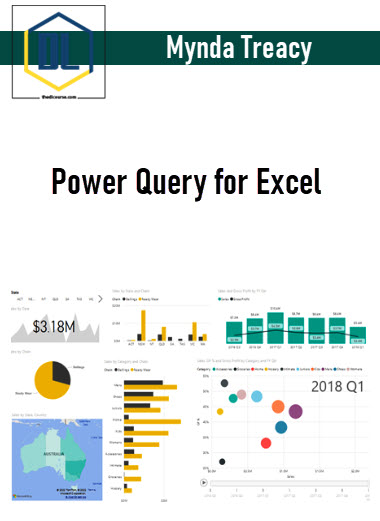
Mynda Treacy – Power Query for Excel
Original price was: $259.00.$57.00Current price is: $57.00.
Description
Mynda Treacy – Power Query for Excel
SalePage: Mynda Treacy – Power Query for Excel
Description of Power Query for Excel
Do you spend time each month cleaning and transforming data into the right format before you can even begin to analyse it or incorporate it into your reports?
Do you perform repetitive data cleansing tasks like:
- Deleting rows, columns, or blanks
- Filtering out data you don’t need
- Fixing the layout so it will work in a PivotTable
- Splitting or joining columns or text
- Removing spaces and special characters from your data
- Merging worksheets, text/CSV files together
- Extracting data from an external database
- Incorporating the next month’s data to an existing report
- ….and all the other laborious repetitive tasks that put you to sleep and give you RSI
Tasks you imagine macros could do in seconds, if only you knew how. Or maybe you have some macros that handle it all but keeping the VBA code up to date is constant task and no one else knows how to update it.
The Good News
If you have Excel 2010, or later, you can use Power Query to automate the tasks of:
- Getting your data – from almost anywhere
- Cleaning and reformatting your data – so it works in PivotTables etc.
- Updating your reports – Power Query will update new or existing Tables, PivotTables or Power Pivot models
You see once you show Power Query where to find your data and how you want it cleaned and reformatted (which is dead easy), it will remember the steps so next time you can simply hit the Refresh button and it’ll do it automatically.
And this means you can get on with the fun part of analysing the data and impressing your boss so you can go home early.
And the best part is there’s NO VBA or programming required.
In fact you’ll be up and running faster than it would take you to learn the equivalent formulas required to perform the same tasks.
What is Power Query?
Power Query is a free add-in built by Microsoft for Excel users like you and I. It’s available in all Desktop versions of Excel 2010 and 2013.
And in Excel 2016, 2019, 2021 and Office 365 it’s built right into the Data tab in the Get and Transform group:
It’s also available in Power BI Desktop.
What does Power Query do?
1. Power Query gets your data from almost anywhere – the web, databases, Excel files, Facebook, OData, SharePoint, Salesforce etc. and the list keeps on growing with new data sources being added all the time.
2. Power Query enables you to clean, transform, merge and append data with a point and click style GUI that’s easier to learn than formulas or VBA.
3. Load the data into Excel and or Power Pivot and consume it in your analysis, reports or export elsewhere.
Readmore about: Mynda Treacy
Delivery Policy
When will I receive my course?
You will receive a link to download your course immediately or within 1 to 21 days. It depends on the product you buy, so please read the short description of the product carefully before making a purchase.
How is my course delivered?
We share courses through Google Drive, so once your order is complete, you'll receive an invitation to view the course in your email.
To avoid any delay in delivery, please provide a Google mail and enter your email address correctly in the Checkout Page.
In case you submit a wrong email address, please contact us to resend the course to the correct email.
How do I check status of my order?
Please log in to TheDLCourse account then go to Order Page. You will find all your orders includes number, date, status and total price.
If the status is Processing: Your course is being uploaded. Please be patient and wait for us to complete your order. If your order has multiple courses and one of them has not been updated with the download link, the status of the order is also Processing.
If the status is Completed: Your course is ready for immediate download. Click "VIEW" to view details and download the course.
Where can I find my course?
Once your order is complete, a link to download the course will automatically be sent to your email.
You can also get the download link by logging into your TheDLCourse account then going to Downloads Page.
Related products
-73%

Original price was: $99.90.$27.00Current price is: $27.00.
-86%

Original price was: $399.00.$57.00Current price is: $57.00.
-60%
Original price was: $50.00.$20.00Current price is: $20.00.
-75%
Original price was: $119.00.$30.00Current price is: $30.00.
-65%

Original price was: $49.00.$17.00Current price is: $17.00.
-84%

Original price was: $420.00.$67.00Current price is: $67.00.
-75%

Original price was: $147.00.$37.00Current price is: $37.00.
-67%

Original price was: $49.00.$16.00Current price is: $16.00.